Oobleck Time...Let's Read and Experiment With Science

Friday, February 24, 2017 No comments
It is almost time for Read Across America! Time for reading...and science! Time for Oobleck! This simple science activity is sure to get them excited about both! I am so thrilled to share one of my favorite lessons that works perfectly with my FOSS Solids and Liquids Unit. We spend a lot of time trying to add engaging activities to our school day and  this one seems to really surprise and amaze my students. The book Oobleck is a fun Dr. Suess book that links science into your classroom!

Fun with Non-Newtonian Fluids!


Here is my hour long lesson plan...
1. We start with the characteristics of a solid and a liquid
2. I then share with them that today we are going to learn about something that acts like a liquid and a solid. I then share with them it is all because of King Derwin of Didd. I then share with them the book. It is a long book...but reading it and changing your voice keeps them engaged!
3. We then use the the Oobleck sheet that has them see how Oobleck acts...Is it a solid or liquid?
4. We continue our experiments with five objects that either sink or stay on the top. The students are amazed as to how it acts.
5. We wrap up by writing the recipe for Oobleck and understand a non-Newtonian fluid by filling in the blanks.
6. I they get done early I have them add to our classroom graph...Do You Like Oobleck?

 I have each table set up before they come in and they meet me at the carpet for the intro and book. This helps when my time is limited...

You can find my OOBLECK TPT Pack Here!


How do you celebrate? This next week I get to dress in a mascot costume from our local baseball team as a guest reader! We are also doing a read-a-thon to raise money for our all school...in school carnival at the end of the year! Would love to hear how you celebrate!

Google Can Be Snow Much Fun!

Sunday, January 29, 2017 No comments
In the time of the digital age...where everyone of my 400 students that I teach comes to me with an iPad...I needed to figure out how to use them and FAST! Should I use Google Classroom? Does my district expect me to use a certain app. My district's expectations is that I use Explain Everything and put many of my ideas and lessons into itsLearning.

Here my kiddos are using Explain Everything and a resources sheet I made. They can make it interactive by adding videos, voice recordings, pictures, and words!
In your own classroom, I can just see it...you might have each child able to use a Chromebook...go to the computer lab...or have their own device for them to work with! The learning curve is HUGE! I have an amazing team of specialists that help each other and so as a team we have been able to figure this out together!

There are lots of great ideas to help you with this process. Whether it is unit for science...a reading activity that can be used from Google Classroom...even a great Math interactive for your computers...check out #nogoogleprep on TPT!

Here, one of my 3rd graders is reviewing her video as she just experimented with water on a slope and different water drop sizes. She is able to process what she just observed and then share out! It sure helps my students to be able to see what they just did...then process it more than once. Then...we can go back to it the next time we have science and they can recall!

Check out the many teachers ready to share what they have learned...

Search #noprepgoogle on TPT today!

New Year, New You

Wednesday, January 18, 2017 1 comment
This year I have had many firsts.  Some of these firsts include fist time building a house (still under construction), first time sending my own child to Kindergarten, first time looping, and first time teaching first grade.  When starting out the school year I spent numerous house searching TPT to see "what I should be teaching."  I scoured Pinterest, talked to my new teammates, and reflected on my teaching beliefs.  After a summer of moving classrooms, packing up all my Kindergarten materials and eventually setting up my classroom, it was time for me to figure out my curriculum.  For the first time in a long time I had to think about where to start, what to teach, and how to teach it.  To be honest I was completely overwhelmed.

I did what we all do, I started the school year.  I am a very sequential and organized person, and the feeling of grabbing at straws became my norm this year.  This for me, meant chaos, and I do not like chaos.  I felt like I was letting my kiddos down.  So over winter break, I took back my organized ways and began "planning the year."  I started by using a template that allowed me to look at each week and each subject or area I wanted to have planned out.  I am not going to lie, this was a HUGE undertaking, but has so far panned out and has saved me hours of planning.

So, you may be asking yourself, "where do I start?"  Well, this is where I started....I began by looking at the standards (I know not very exciting-but useful).  I looked at one strand and began thinking about the first half of the year.  I asked myself, "What did my Kiddos enter first grade knowing?" (I also used my many year of teaching Kindergarten to knowing the standards to help with this question).  I then wrote each of the components on individual (small) post-it notes.  I then began placing them in what I thought was a chronological order (I saw thought because I changed it many times until it all made sense).  I then repeated this for all the strands in all the content areas. (Remember when I said it was HUGE undertaking???)


Once all the post-its were completed I began writing them in on the Scope Planner Template.  To help me with this, I looked at holidays, breaks, and assessments schedules.  I then altered the post-it notes to fit.  

Once I filled out the content areas on the scope, I went back to fill out center themes, song and poems for the weeks, and the best thing on there....Assessments!  I made a column for formal assessments and informal assessments.  I did this because, no matter how organized I was, assessment time ALWAYS snuck up on me.  I was always scrambling to make copies, organize my assessment piles all while continuing to teach.  This year, since I added these to my scope, I know what I am testing on what week, and because I have it all scheduled out, I do not miss an assessment nor do I scramble last minute.  

This leads me to the last part of the "New Year, New Me" plan.  I took all the files that matched my scope (assessments and all) and placed them into a large binder with tabs that correspond to the weeks on my scope.  I have a volunteer come in once a week to make copies for me, so all I have to do is open my binder, pull the paper out, and voila! My next week is prepped (I just have small things to prep along with reading and math groups each week)!

If you are ready, or even if you are not, I have uploaded a template that you can use to wither start a similar process that I did, or just to track what you have done are are going to do from now on.  


{You can get the template here}

I encourage you to find something that you can do for you.  By me creating the scope, I feel like I am able to spend more time with family and have been able to relax!!!

What are you going to do in the new year to help you?  Please comment below with ideas or motivation for others!


Holiday STEM In The Spotlight!

Saturday, December 17, 2016 No comments

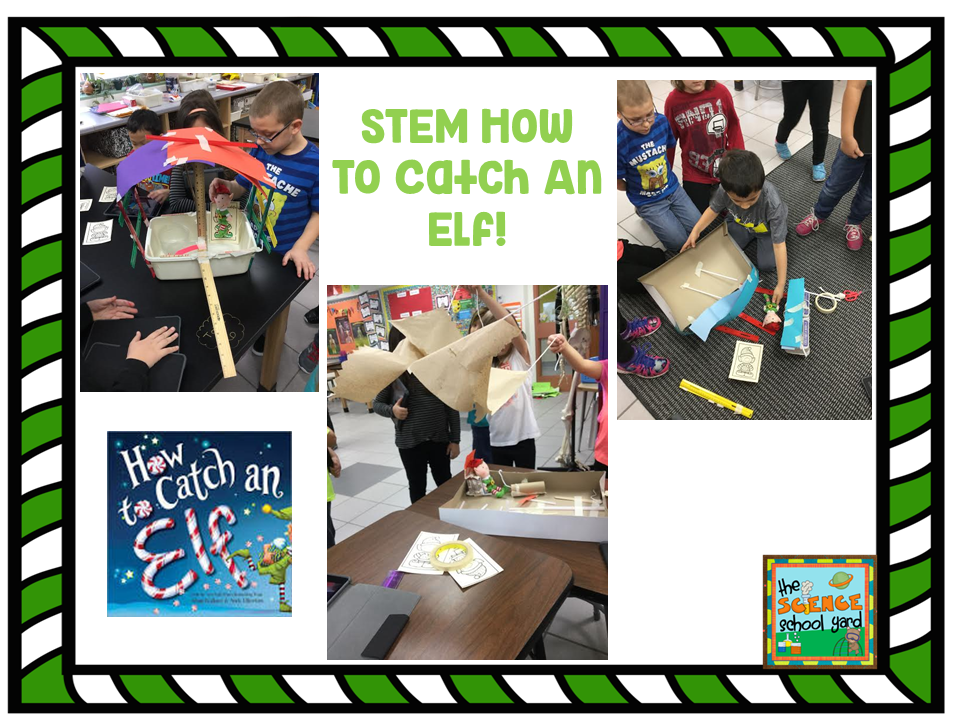
Find the Elf Pack Here
One of my favorite things to do around the holidays is to find a way for all of the 400+ students K-5th grade be able to connect a fun seasonal book to a STEM activity.
Up until this point, we have been able to do some quick Halloween STEM activities, and a few NGSS STEM connections in a few of the classes, however using the FOSS road map that our district has developed is what often drives my theme or lessons. Lucky enough, I have been able to find ways to join some of those lessons together as well as integrate activities using our Ipads...so it allows me some flexibility to add NGSS...STEM...and extra activities that I create that go with our theme.


Here are some tips to integrate any of the fun STEM packs that I have in my TPT store!

Find The Gingerbread Pack Here

Tip 1: Pick a theme

This week's lessons  look like this...

K-weather connections using Three Cheers for Tacky, building a structure for the Penguin to keep him warm using toothpicks and marshmallows and a fun penguin pattern...they sure are Tacky!
1st Grade- How to Catch an Elf...we are learning about size and property words.
2nd Grade-FOSS Solids and Liquids and the Gingerbread Man
3rd Grade-FOSS Water...make a boat to float on water to keep the Gingerbread Man from having to rely on the fox to get across the river
4th Grade-FOSS Human Body and Elf on a Shelf... Mr. Bones style and Elf Traps
5th Grade-FOSS Mixtures and Solutions and Mr. and Mrs. Clause and separating mixtures

 Tip 2: Pick a Picture Book

With the opportunities to integrate some STEM lessons, I always try to find a fun picture book that will help set the tone. Here are some of the books I am using this week.

Tip 3: Find ways to integrate what you are already doing in your classroom...Look at the standards and find a way to incorporate them into a hands-on STEM project! I also challenged my older kiddos to finish something that was in our road map before they could work on a STEM project, and you should see how fast they start to work to get to be able to build!

Lots of great winter, Christmas, and New Year STEM ideas for the season. Check it out at my TPT Store!

Hang in there...just a few more days for those of us that have to teach right up until break! Happy Holidays!

FREE Sight Word Resources in English and Spanish

Sunday, December 11, 2016 No comments

Teaching children to read includes three main areas of focus.  

These include 

phonics, 

sight words, 

and reading strategies.  

Help your students learn their sight words in English or Spanish with one of these free resources!


Find other free resources at: